- Model Selection: Run
ollama pull qwen2.5-coder:7bfor 8-16GB RAM setups, or14bfor 16-24GB VRAM/Macs. - Context Extension: Write a custom
ModelfilewithPARAMETER num_ctx 16384so the model can read multi-file codebases. - IDE Split: Use
qwen2.5-coder:1.5b-basefor sub-50ms tab completions in Continue.dev, and the 7B/14B model for interactive chat refactoring.
Tested during a complete test-driven refactoring session of a 14-file Node.js backend using local Ollama inference:
Why local inference won the battle for developer privacy
Relying entirely on cloud AI coding assistants introduces monthly subscription fees, strict API rate limits, and enterprise compliance roadblocks when handling sensitive source code. By configuring Ollama as a local inference backend paired with modern IDE extensions, you create an offline, uncapped AI coding copilot that runs directly on your local GPU or Apple Silicon unified memory without sending a single byte to external servers.
This guide provides the exact terminal commands, model selections, and configuration snippets needed to build a high-speed local AI pair programmer on consumer hardware.
Why Local Inference Beats Cloud APIs for Daily Coding
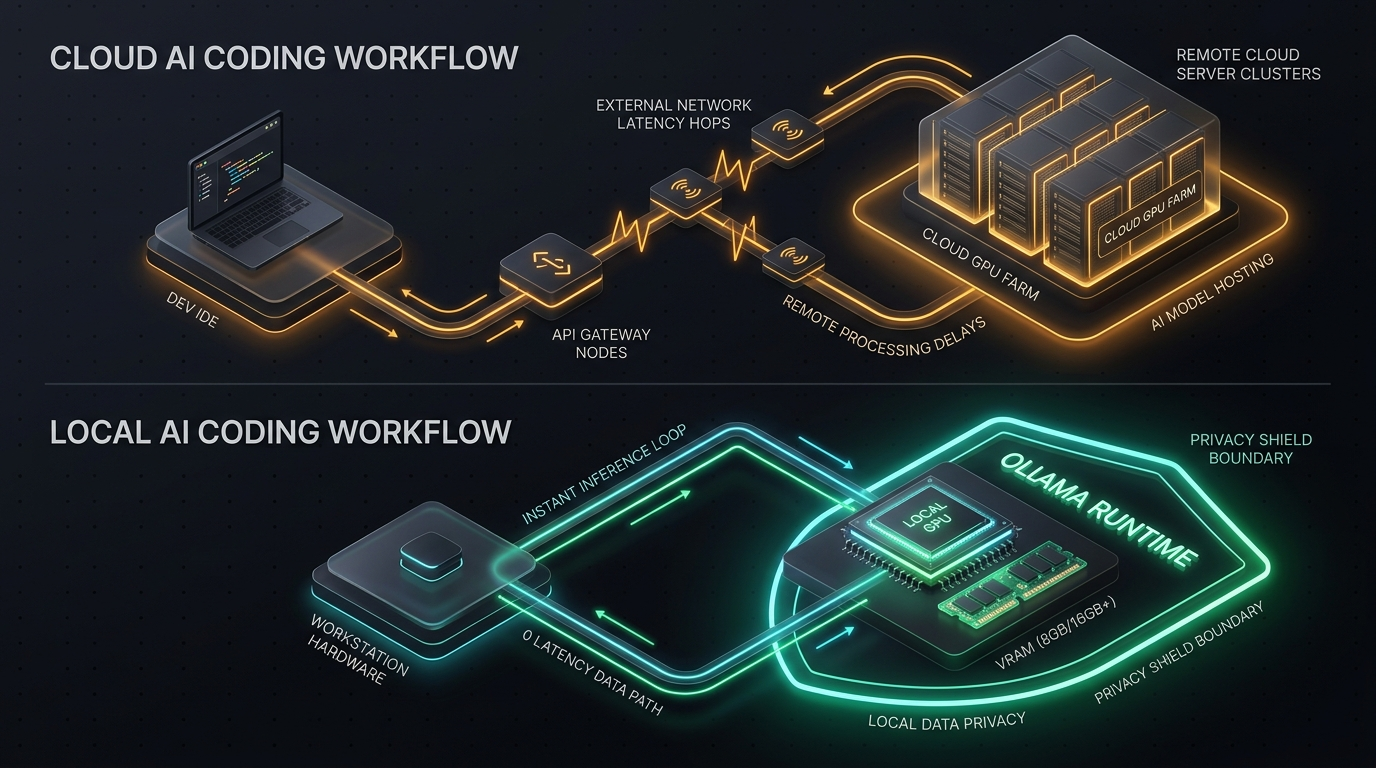
Cloud-hosted coding copilots excel at one-shot question answering, but iterative agent loops—where an assistant reads directories, edits multiple files, runs unit tests, and parses error logs—consume thousands of tokens per minute. On paid API plans, an aggressive refactoring session can quickly exhaust daily budgets or trigger hourly throttling.
Local inference transforms this paradigm:
- Zero Marginal Cost: Run unlimited code generations, recursive test-fix loops, and documentation sweeps without billing anxiety.
- Deterministic Privacy: Your source code, API keys, database credentials, and proprietary logic never leave your physical workstation.
- Offline Reliability: Continue building during flights, campus transit, or intermittent network outages without degradation.
Step-by-Step Implementation
Follow these three steps to configure your local development environment.
Step 1: Install Ollama and Pull Optimized Coding Models
Download and install Ollama for your operating system from the official distribution, then open your terminal to pull the model matched to your available VRAM:
# For 8GB - 16GB RAM / Laptops (Fast, lightweight coding assistant)
ollama run qwen2.5-coder:7b

# For 16GB - 24GB VRAM / Desktops & M-Series Macs (Near-GPT-4 code quality)
ollama run qwen2.5-coder:14b

# For 32GB+ VRAM Workstations (Full repository refactoring)
ollama run qwen2.5-coder:32b
Verify that Ollama's local server is listening and ready to accept requests:
curl http://localhost:11434/api/tagsStep 2: Configure Your IDE Extension (Continue / Cline)
Install the Continue or Cline extension in Visual Studio Code, Cursor, or JetBrains IDEs.
Open your ~/.continue/config.json file and point your autocomplete and chat models directly to your local Ollama port:
{
  "models": [
    {
      "title": "Local Qwen Coder",
      "provider": "ollama",
      "model": "qwen2.5-coder:7b",
      "apiBase": "http://localhost:11434"
    }
  ],
  "tabAutocompleteModel": {
    "title": "Local Autocomplete",
    "provider": "ollama",
    "model": "qwen2.5-coder:1.5b-base",
    "apiBase": "http://localhost:11434"
  },
  "contextProviders": [
    { "name": "diff" },
    { "name": "folder" },
    { "name": "codebase" }
  ]
}Setting a dedicated lightweight model (such as qwen2.5-coder:1.5b-base) for inline tab-completions guarantees sub-50ms latency, while reserving the larger 7B or 14B model for multi-file refactoring queries.
Step 3: Configure Context Windows and Memory Retention
By default, Ollama initializes with a modest 2,048 token context window. For multi-file codebases, create a custom Modelfile to expand the context window to 16,384 or 32,768 tokens:
FROM qwen2.5-coder:7b
PARAMETER num_ctx 16384
PARAMETER temperature 0.2
Build and register your customized model with the expanded context:
ollama create local-coder-16k -f ./ModelfileActionable Prompts & Pair Programming Directives
Use these structured prompt blueprints inside your IDE chat panel for consistent, high-yield code generation:
Prompt 1: Strict Test-Driven Generation (TDD)
1. Write comprehensive unit tests in Vitest/Jest covering happy paths and 3 critical edge cases.
2. Provide the minimal production implementation in @service.ts that satisfies all tests.
3. Do not include conversational filler; output only runnable code blocks.”
Prompt 2: Autonomous Bug Diagnosis & Profiling
1. Identify the root cause of the memory leak or index boundary exception.
2. Explain why the bug occurred in 2 concise bullet points.
3. Provide the corrected drop-in replacement function with defensive type guards.”
Model Selection & Hardware Benchmark Matrix
Select the configuration that matches your physical hardware constraints:
| Model / Stack | Generation Speed | License | Min Hardware | Best Use-Case |
|---|---|---|---|---|
| Qwen 2.5 Coder 7B | 45–65 tok/sec | 100% Free / Apache | 8GB RAM / GTX 1660 | Students, quick scripting, inline refactoring |
| Qwen 2.5 Coder 14B | 30–45 tok/sec | 100% Free / Apache | 16GB Unified / RTX 3080 | Complex OOP architecture, unit test suites |
| Qwen 2.5 Coder 32B | 15–25 tok/sec | 100% Free / Apache | 24GB VRAM / RTX 3090/4090 | Enterprise refactoring, full module synthesis |
| DeepSeek Coder V2 Lite | 35–50 tok/sec | 100% Free / Open | 16GB RAM | Web stacks, TypeScript, Python data science |
Where local models fall short (and when you still need frontier APIs)
Running AI locally on your own silicon is liberating, but local models are not a silver bullet. Being realistic about their boundaries prevents wasted debugging hours:
While a 7B or 14B model writes immaculate TypeScript functions and regex filters, it struggles with systemic reasoning across 30+ interconnected modules. For complete system migrations or complex distributed microservice designs, frontier models like Claude 3.5 Sonnet or GPT-4o still possess deeper contextual reasoning.
Quantizing a model down to 4-bit weights saves massive amounts of VRAM, but attention fidelity decays when feeding more than 16,000 continuous tokens. The model can "forget" types declared at the very top of your prompt file. Always isolate the specific file you want modified.
Frequently Asked Questions
Can I run Ollama on a laptop without a dedicated Nvidia GPU?
Yes. Apple Silicon Macs (M1/M2/M3/M4) run quantized models with high throughput thanks to unified memory architecture. On Windows and Linux laptops without a discrete GPU, Ollama executes on the CPU with AVX2 acceleration; models up to 7B parameters remain responsive for everyday debugging.
How does Qwen 2.5 Coder 14B compare against cloud models?
On standardized benchmarks such as HumanEval and MultiPL-E, Qwen 2.5 Coder 14B achieves coding accuracy competitive with early GPT-4 iterations. While frontier cloud models maintain an edge on highly abstract reasoning, local coder models frequently outperform cloud alternatives in syntax accuracy and adherence to concise instructions.
Does running a local model drain laptop battery quickly?
Continuous inference activates the GPU/NPU, which increases power draw. For extended mobile sessions, utilize a 1.5B or 3B model for inline autocomplete and trigger the 7B model on-demand for complex functions.
How do I update model weights when a newer revision is released?
Simply run ollama pull <model-name> in your terminal. Ollama automatically downloads updated delta layers without breaking existing IDE integrations or configuration paths.