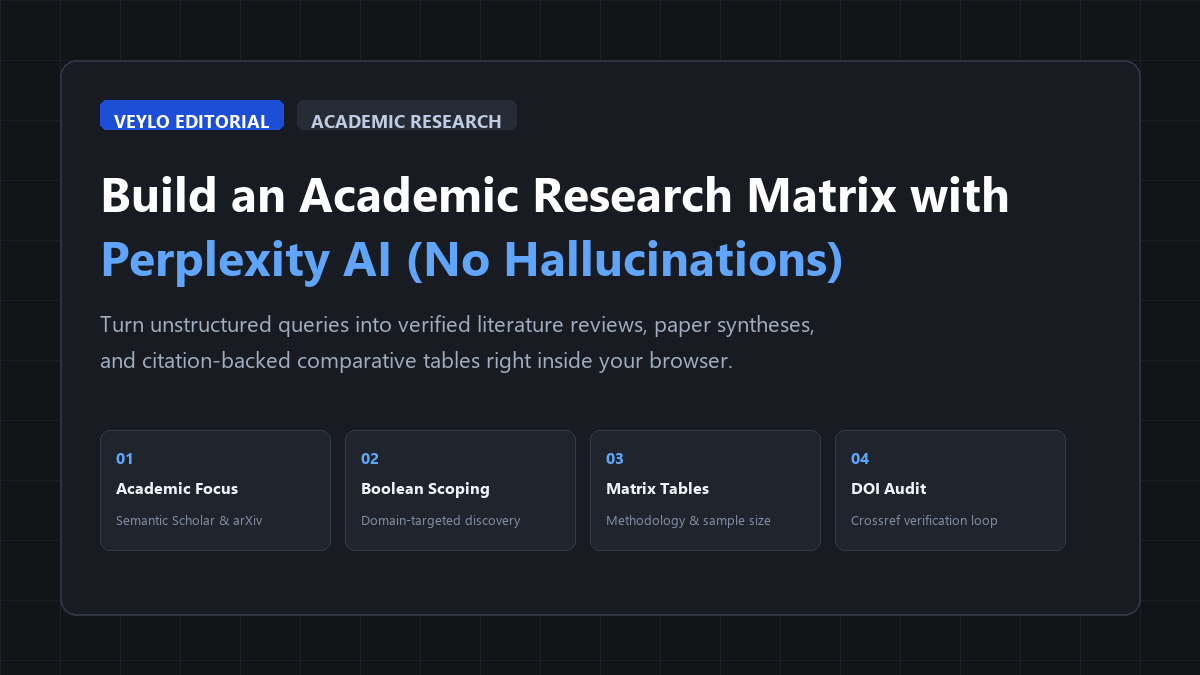
- Isolate the Academic Corpus: Never use default web search for coursework or thesis prep. Set Focus to Academic mode to restrict discovery to Semantic Scholar, arXiv, PubMed, and Crossref repositories.
- Extract Structured Tabular Matrices: Instruct the model to return papers in a clean markdown table comparing sample size, methodology, core findings, and acknowledged limitations.
- Run the 60-Second DOI Verification Loop: Check every cited digital object identifier through Crossref before taking notes into your reference manager.
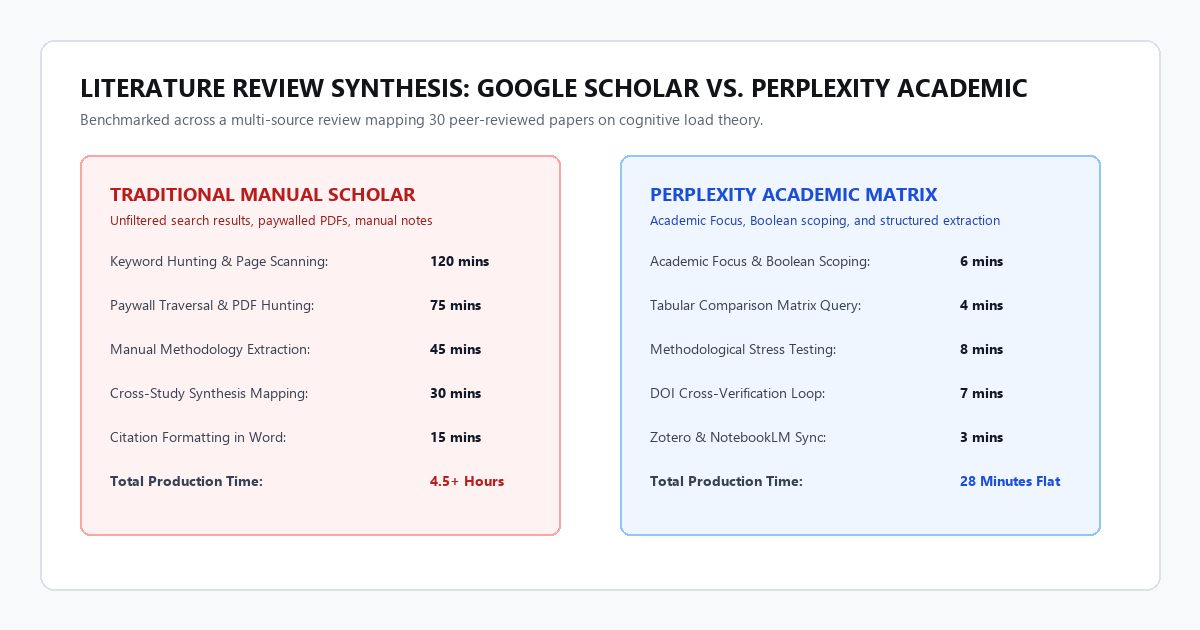
Benchmarked across a multi-source literature review mapping 30 peer-reviewed papers on cognitive load theory and digital interfaces:
The literature search problem
Most university students lose hours to the same repetitive research routine. You open Google Scholar, type three keywords, and see forty search results with paywalled PDFs. You open twenty browser tabs, scan abstracts, copy citations into a word processor, and lose track of which paper made which claim.
When students try using standard chatbots like ChatGPT or Gemini to fix this problem, things get worse. Language models without live retrieval make up paper titles, invent fake co-authors, and generate convincing digital object identifiers (DOIs) that lead to 404 error pages.
Perplexity AI solves this retrieval problem when used correctly. It functions as an answer engine backed by real-time citations. However, if you open Perplexity and type queries into the default search box, you get another trap: SEO blog spam. Default search pulls from tech blogs, corporate whitepapers, and Reddit threads instead of peer-reviewed consensus.
To turn Perplexity into a reliable research assistant for term papers, literature reviews, or dissertations, you need a disciplined framework. You must lock your search boundary, structure your extraction prompts, and verify references before writing your first draft.
Setting up an academic workspace in Perplexity
Do not run academic searches from the general home feed. Your queries get buried in your history, and the system prompt defaults to general web retrieval. Take two minutes to configure a dedicated workspace.
1. Enable Academic Focus mode
Click the Focus pill underneath the search input bar. By default, it says “All”. Switch it to Academic.
This single click changes how Perplexity gathers sources. Instead of scraping commercial websites and news feeds, it directs its web scraper to structured scholarly repositories:
- Semantic Scholar
- arXiv
- PubMed
- Crossref open index
2. Create a project Collection
If you work on a term paper or thesis chapter, open the left sidebar and click Collections. Create a new Collection named after your research topic (for example, Cognitive Load in Mobile UI).
Add a persistent custom instruction prompt to the Collection:
You are an academic research assistant for literature reviews.
Rules:
1. Only cite peer-reviewed journal articles, conference proceedings, or indexed preprints.
2. For every cited claim, provide: Author (Year), Journal/Repository, and direct DOI link.
3. Explicitly state the study's sample size, methodological design, and primary limitation.
4. If a finding is based on an unverified preprint, flag it with "[PREPRINT]".
5. Never invent or infer a citation. If empirical data is unavailable, state: "No indexed peer-reviewed source found."
Every thread created inside this Collection inherits these constraints automatically. You do not need to retype your formatting rules on every prompt.
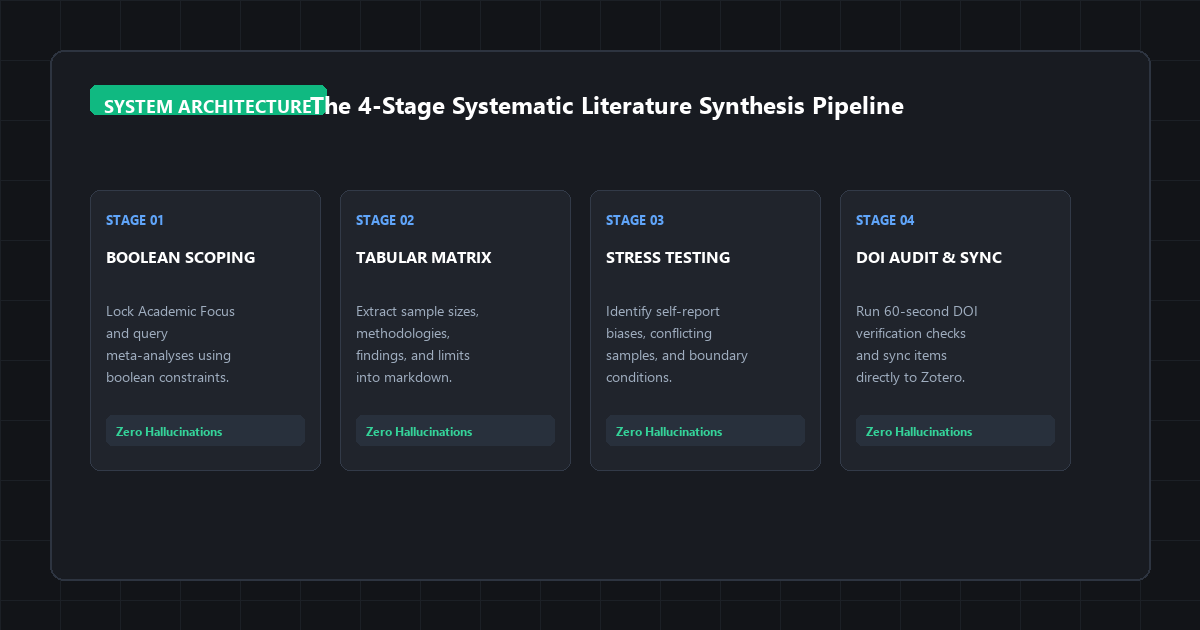
The 4-stage systematic literature synthesis pipeline
Treating an AI research engine like a search bar produces fragmented results. To assemble a comprehensive research matrix, follow a four-stage pipeline.
Stage 1: Boolean domain scoping
Start broad to locate the foundational papers and review articles in the field. Avoid asking conversational questions like “What do scientists think about student attention spans?” Conversational queries invite chatty, vague responses.
Use structured search strings with domain-specific vocabulary:
Query: ("cognitive load theory" OR "split-attention effect") AND ("digital learning" OR "mobile interfaces") review paper meta-analysis filetype:pdf
Perplexity returns a synthesized overview supported by 5 to 10 indexed academic papers. Check the citation cards at the top of the answer. Look for meta-analyses and systematic reviews published in the last five years. These papers cite the foundational experiments you will need later.
Stage 2: Tabular matrix extraction
Once you identify the core debate in your topic, ask Perplexity to structure the findings into a comparison matrix. Reading text summaries across ten papers makes it difficult to spot conflicting results. A structured table makes contradictions immediately visible.
Paste this prompt directly into your thread:
Format the response as a markdown table with these exact columns:
1. Citation (Author, Year, Journal)
2. Methodology & Sample Size (e.g., randomized trial, n=140 undergraduates)
3. Core Independent & Dependent Variables
4. Primary Empirical Finding
5. Acknowledged Limitations / Boundary Conditions
6. Direct DOI URL
Do not summarize outside the table.
The resulting table extracts the exact details you need for your literature review chapter. You can quickly see whether a finding holds across diverse demographics or whether it was tested on forty psychology freshmen in 2018.
Stage 3: Methodological stress testing
Most student essays fail because they accept paper abstracts at face value. Authors naturally highlight positive findings in their abstracts while tucking small sample sizes and statistical caveats into the discussion section.
Use Perplexity to interrogate the methodology across your source set:
Answer these specific questions:
1. Which studies relied solely on self-reported survey data versus direct physiological or behavioral measurement?
2. Are there conflicting conclusions between [Author A, Year] and [Author B, Year]? If yes, what methodological difference accounts for the discrepancy?
3. What demographic or technical conditions cause the reported effect to disappear?
This query gives you analytical depth. Instead of writing “Smith (2021) showed that mobile interfaces increase distraction,” your review can state: “While Smith (2021) reported elevated task times on mobile devices, their sample was limited to unmoderated remote sessions, which Johnson (2023) failed to replicate under controlled laboratory conditions.”
Stage 4: Citation export and Zotero integration
Perplexity allows you to export your thread. In the top-right corner of the interface, click the Share button or copy the generated markdown table directly.
Paste the markdown table into your personal notes or obsidian vault. For each DOI listed, paste the identifier into Zotero (via Add Item by Identifier) or your reference manager. Zotero pulls down the complete metadata, author list, and open-access PDF in seconds.
Perplexity Pro vs. Free Tier: Model Capabilities, Token Limits & Privacy Matrix
You do not need a high-end workstation to run this research workflow. Because processing occurs on remote search clusters, any modern web browser works. However, knowing the account constraints prevents interrupted research sessions.
| Feature / Dimension | Free Tier Account | Pro Subscription | Operational Recommendation |
|---|---|---|---|
| Academic Focus Mode | Unlimited basic searches | Unlimited basic + Pro searches | Use basic Academic search for discovery; reserve Pro for complex tables. |
| Pro Search Multi-Step Reasoning | 5 queries every 4 hours | 300+ queries per day | Use your 5 free Pro queries for Stage 2 (Tabular Matrix) and Stage 3 (Stress Testing). |
| File Uploads (PDF Ingestion) | 3 files per day | Unlimited file uploads | Upload course syllabi or specific paywalled papers for local cross-synthesis. |
| Collections Storage | Unlimited Collections | Unlimited Collections | Create a separate Collection for each paper or course module. |
| Browser Compatibility | Chrome, Firefox, Safari, Edge | Chrome, Firefox, Safari, Edge | Install the Perplexity Chrome extension for 1-click page summarization. |
The cognitive trap: where academic AI search breaks down
AI research tools create a feeling of effortless competence. You type a prompt, receive twelve formatted citations, and assume your research is complete. This assumption is a cognitive trap.
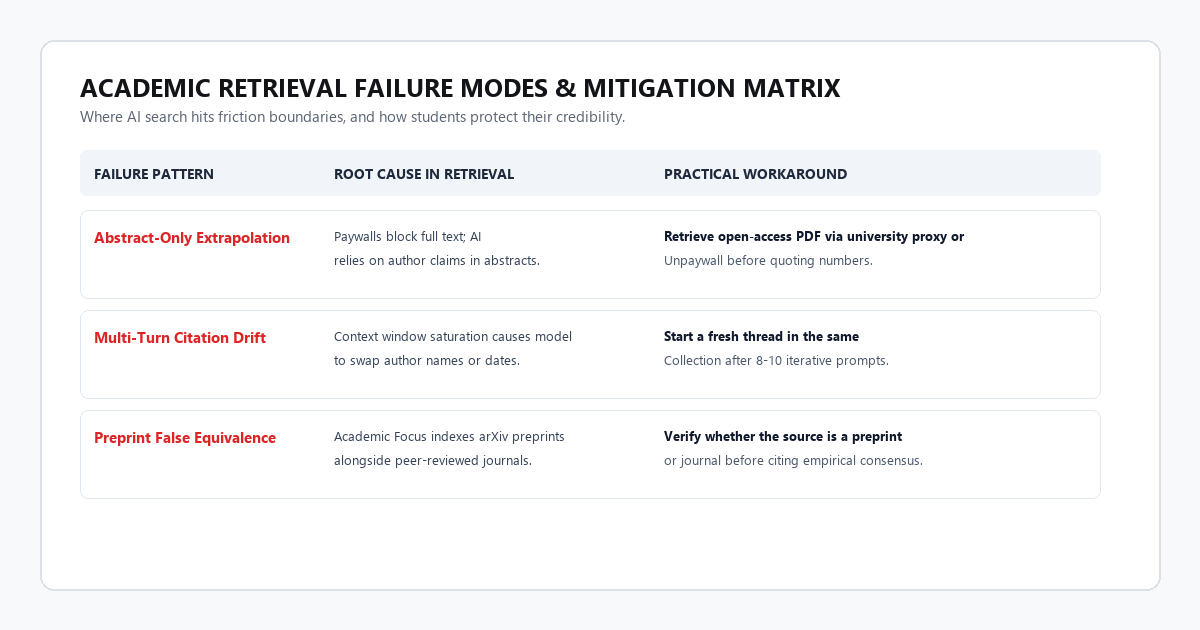
Understanding the specific failure modes of academic retrieval protects your credibility before you submit your work.
1. Abstract-only extrapolation
Academic search engines index open-access metadata, titles, and abstracts. In many cases, paywalled publishers do not allow the search crawler to read the full methods and data tables behind the paywall.
When Perplexity synthesizes a paywalled study, it often synthesizes the author abstract. If the authors overstated their conclusions in their abstract, the AI uncritically repeats those claims. Always download the open-access PDF through your university library proxy or Unpaywall before citing specific statistical values.
2. Multi-turn citation drift
As an interactive chat thread grows beyond 8 to 10 queries, the context window fills up. When this happens, Perplexity can suffer from citation drift: it attributes a finding from Paper A to Paper B, or it combines two different authors into a single reference.
When you notice the conversation slowing down or referencing earlier papers incorrectly, start a fresh thread inside the same Collection. Do not let a single research thread run for thirty prompts.
3. Preprint false equivalence
Academic Focus indexes preprint repositories like arXiv and bioRxiv alongside peer-reviewed journals. Preprints have not undergone peer review. Some preprints contain preliminary data that fails replication.
Look closely at the source tags. If a paper lists arXiv:2403.xxxxx, treat it as an unvetted working paper rather than established scientific consensus. Note this distinction explicitly in your writing.
4. The 60-second DOI verification protocol
Before you write any paper using citations generated during an AI session, run this simple three-step check on every source:
2. Paste it directly into your browser: https://doi.org/[PASTE_DOI_HERE]
3. Confirm three data points match the AI output:
• Does the URL resolve to an active publisher page?
• Do the lead author and publication year match?
• Does the abstract describe the same experiment?
If a link returns a 404 error, delete the citation immediately. It is an artifact of token prediction, not real research.
Moving from literature matrix to finished draft
A literature review is not an annotated list of summaries. It is a critical synthesis that shows how ideas connect, where researchers disagree, and what questions remain unanswered.
Once your Perplexity table is complete and verified, your research workflow shifts from collection to synthesis:
- Export your table into your markdown note repository or Google Docs.
- If you have 10 to 20 full-text PDFs, load them directly into Google NotebookLM. NotebookLM acts as a closed-book citation engine over your local files, allowing you to ask hyper-specific questions across your verified library without any web hallucination risk.
- Combine this with an AI-powered study system to build active-recall questions based on the methodology and controversies in your source papers.
- Write your first draft by organizing paragraphs around themes and debates, using your verified matrix as the source of empirical data.
You avoid the late-night panic of chasing broken citations, and you spend your study time analyzing findings rather than wrestling with search engines.