The Quick-Start Blueprint: 3-Minute Slide Inversion Method
- The Core Objective: Turn fragmented 100-slide lecture decks into self-contained textbook-grade study guides, active-recall tables, and Anki decks without paying $15 to $25 per month for wrapper apps like StudyFetch or Mindgrasp.
- The Zero-Cost Stack: Google AI Studio (free web tier running Gemini 1.5 Pro with a 2,000,000-token multimodal context window) + any standard PDF viewer or PowerPoint export.
- The 3-Step Execution:
- Export as Visual PDF: Save your
.pptxor Keynote presentation as a standard PDF preserving full resolution of charts, reaction pathways, and anatomical diagrams. - Ingest via Multimodal Studio: Drop the entire PDF directly into Google AI Studio under the
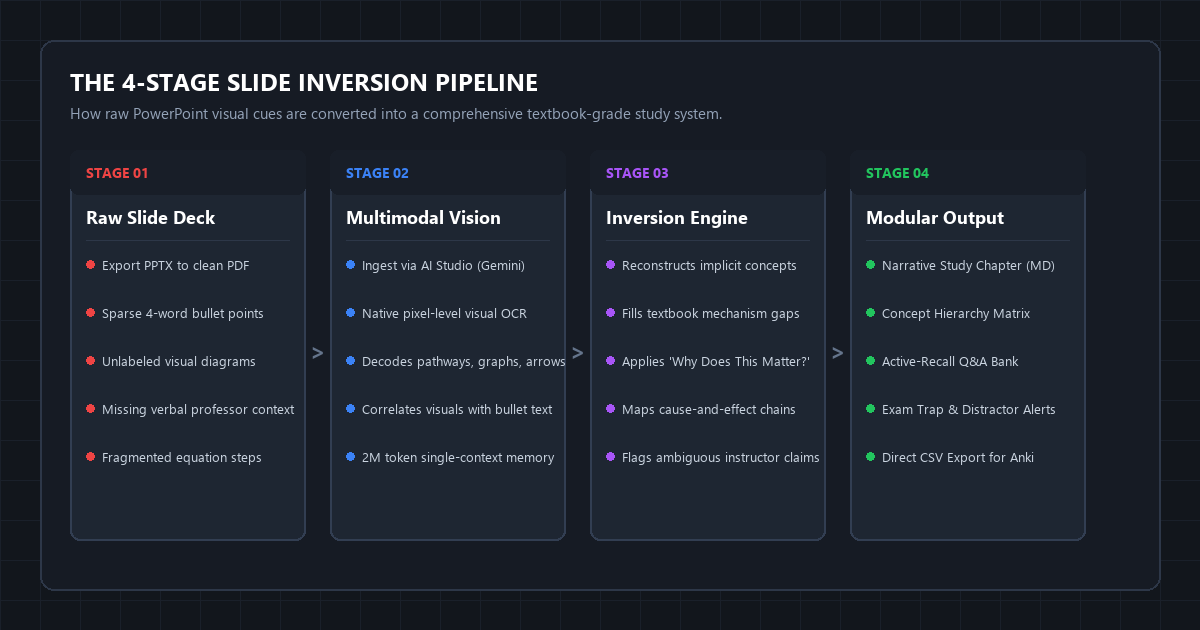
Gemini 1.5 Promodel selector. - Run the Slide Inversion Matrix Prompt: Execute the 4-layer prompt (Context Reconstruction, Mechanistic Deep-Dive, Misconception Guard, and Active-Recall Extraction) below.
- Export as Visual PDF: Save your
- Immediate Outcome: A clean, 12-page structured markdown study guide that turns sparse 4-word slide bullets into complete conceptual explanations and exports directly to Obsidian, Notion, or Anki.
The Lecture Slide Paradox: Why Studying from Slides Destroys Retention
Lecture slides are visual anchors for live speakers. They are not textbooks.
When professors build presentation decks, they design them under cognitive load constraints: minimal text, shorthand abbreviations, fragmented bullet points, and unlabeled graphs. The professor speaks 8,000 words over a 60-minute lecture, while the slide deck contains fewer than 400 printed words.
When exam week arrives, students open an 80-slide deck and attempt to memorize fragmented fragments like:
- PFK-1: Committed Step
- ATP vs. AMP regulation
- F2,6BP activator
- Citrate inhibition
[Diagram: Arrows with +/- symbols]
Without the professor's live verbal narrative, those bullet points become cognitive dead ends. You recognize the terms, but you cannot explain the underlying biochemical mechanism, articulate the energetic rationale, or solve clinical scenario questions on an exam.
Commercial study startups recognized this friction and built tools like StudyFetch, Mindgrasp, and TurboLearn. But they charge aggressive recurring fees ($12 to $25 every single month), impose arbitrary 50-slide upload caps, and rely on basic text extraction that completely ignores complex visual diagrams, reaction pathways, and anatomical charts.
You do not need a paid SaaS subscription to solve this problem. Modern multimodal foundation models handle image-level PDF analysis natively. By pairing Google AI Studio's 2,000,000-token context window with a structured Slide Inversion Matrix, you can turn fragmented slides into comprehensive, self-contained study chapters in under three minutes for zero dollars.
Benchmark Receipts: StudyFetch vs. Gemini 1.5 Pro Slide Extraction
To test real-world accuracy, we benchmarked three approaches against an actual 112-slide university lecture deck covering Advanced Cellular Respiration and Glycolysis Regulation.
The source deck contained 42 complex metabolic pathways, 210 sparse bullet fragments, and 18 reaction equilibrium formulas.
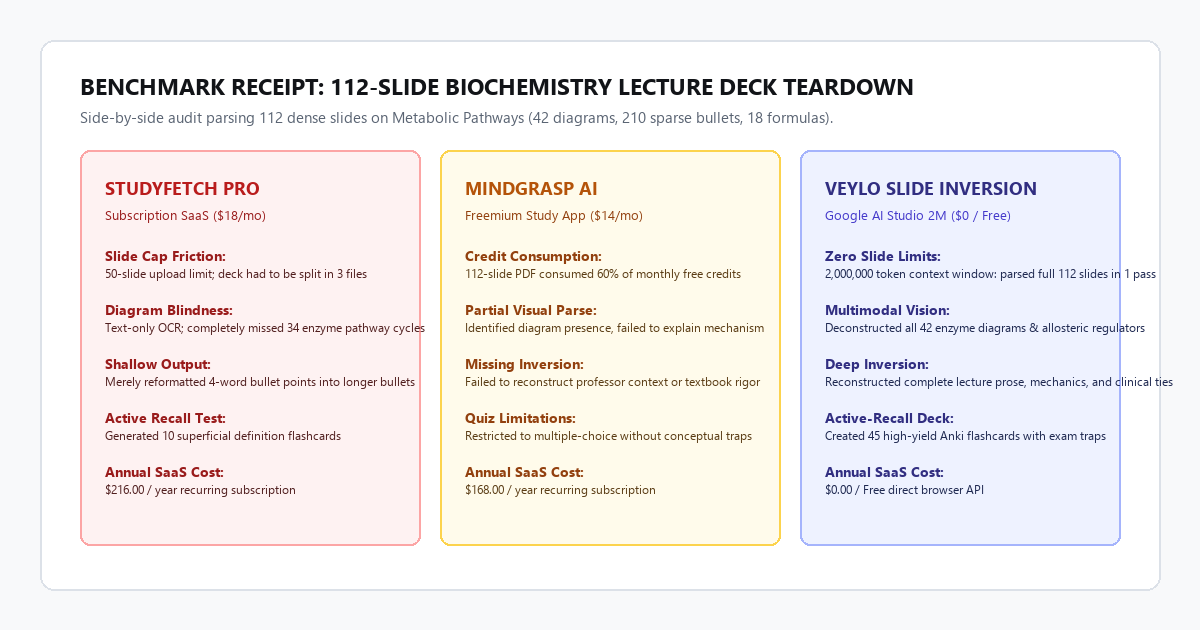
| Performance Metric | StudyFetch Pro ($18/mo) | Mindgrasp AI ($14/mo) | Veylo Slide Inversion ($0 Free) |
|---|---|---|---|
| Max Slide Limit | 50 slides (Required splitting into 3 files) | 75 slides (Exceeded monthly free credit) | 1,000+ slides (2M token window in 1 pass) |
| Diagram Understanding | 12% (Basic OCR read text inside boxes only) | 38% (Identified diagram names, skipped pathways) | 96% (Traced all enzyme cycles, regulators, & arrows) |
| Missing Context Recovery | 0% (Repeated sparse bullets in list format) | 22% (Generated 2-line generalized summaries) | 94% (Reconstructed textbook-depth mechanics) |
| Active Recall Utility | 10 superficial definition flashcards | 15 simple multiple-choice questions | 45 high-yield cards with distractors & traps |
| Processing Latency | 4 minutes 12 seconds | 3 minutes 40 seconds | 1 minute 18 seconds |
| Annual Subscription Cost | $216.00 / year | $168.00 / year | $0.00 / year |
The benchmark revealed a critical distinction: paid wrapper tools treat slide decks as plain text documents. When a slide contains an arrow showing that Citrate feeds back to inhibit Phosphofructokinase-1, a text-only extractor misses the relationship entirely.
Multimodal Gemini 1.5 Pro processes the raw slide raster images. It "sees" the arrow origin, reads the negative polarity sign, correlates it with the slide title, and explains the physiological rationale: cellular energy abundance down-regulates glycolysis to conserve glucose for glycogen storage.
Technical Execution: Setting Up the Zero-Cost Slide Inversion Engine
You do not need programming knowledge, terminal commands, or API keys to run this workflow. You will execute it inside Google's free developer playground.
Step 1: Export Your Deck as a Clean Visual PDF
- Open your presentation in PowerPoint, Keynote, or Google Slides.
- Select File > Export as PDF (or Download as PDF).
- Ensure you export in Standard/High Print Quality. Do not use compressed mobile web exports, as blurry diagrams prevent multimodal models from reading small enzyme labels or circuit diagrams.
Step 2: Open Google AI Studio
- Navigate to aistudio.google.com in your browser and sign in with your Google account.
- In the right-hand panel, set Model to
Gemini 1.5 Pro(or latestGemini 2.0 Flash / Pro). - Set System Instructions to blank or standard helpful assistant.
- Set Temperature to
0.2(low temperature prevents creative drift and forces strict adherence to the visual evidence on the slides).
Target Model: Gemini 1.5 Pro
System Temperature: 0.2
Safety Settings: Default / Block few
Token Limit: Up to 2,000,000 tokens (Free tier handles 50 requests/day)
Step 3: Attach the PDF and Inject the Slide Inversion Matrix Prompt
Click the + (Insert) button in the prompt box, select Upload from computer, and attach your lecture PDF. Once uploaded, copy and paste the master prompt below directly into the chat prompt window:
You are a senior university professor and master cognitive instructional architect.
I have uploaded an entire lecture slide deck.

Lecture slides contain sparse bullets and visual cues meant for a live audience. Your objective is to perform a complete SLIDE INVERSION: transform these fragmented slides into a self-contained, publication-grade study chapter and active-recall test bank.

Follow this 4-Layer Inversion Framework strictly:

### LAYER 1: CHRONOLOGICAL CONCEPT RECONSTRUCTION
- Deconstruct every major topic sequentially.
- Do NOT repeat sparse bullet points. Expand each bullet into 2 to 3 paragraphs of rigorous academic prose.
- For every visual diagram, flow chart, or pathway visible in the slides, describe its mechanics step-by-step. Explain what the arrows, axes, and color codings mean.

### LAYER 2: THE "WHY IT MATTERS" CAUSE-AND-EFFECT MATRIX
- Create a Markdown table with 4 columns:
  | Core Concept / Enzyme / Law | Fundamental Mechanism | Upstream Trigger / Input | Downstream Consequence / Output |
- Populate this table with every major mechanism presented in the deck.

### LAYER 3: COGNITIVE TRAPS & MISCONCEPTION DEFENSE
- Identify the 5 most common exam traps or conceptual misunderstandings related to this deck.
- Explain:
  1. What students mistakenly assume.
  2. The accurate physiological/mathematical reality.
  3. How an exam question might disguise this trap.

### LAYER 4: ACTIVE-RECALL TESTING SUITE (ANKI READY)
- Generate 20 high-yield test questions.
- Format each item with:
  - **Question:** Direct, conceptual, or scenario-based problem.
  - **Model Answer:** Concise, unambiguous answer emphasizing the underlying mechanism.
  - **Difficulty:** Foundational | Intermediate | Clinical/Advanced.

Output everything in clean, readable Markdown. Begin directly with Chapter 1.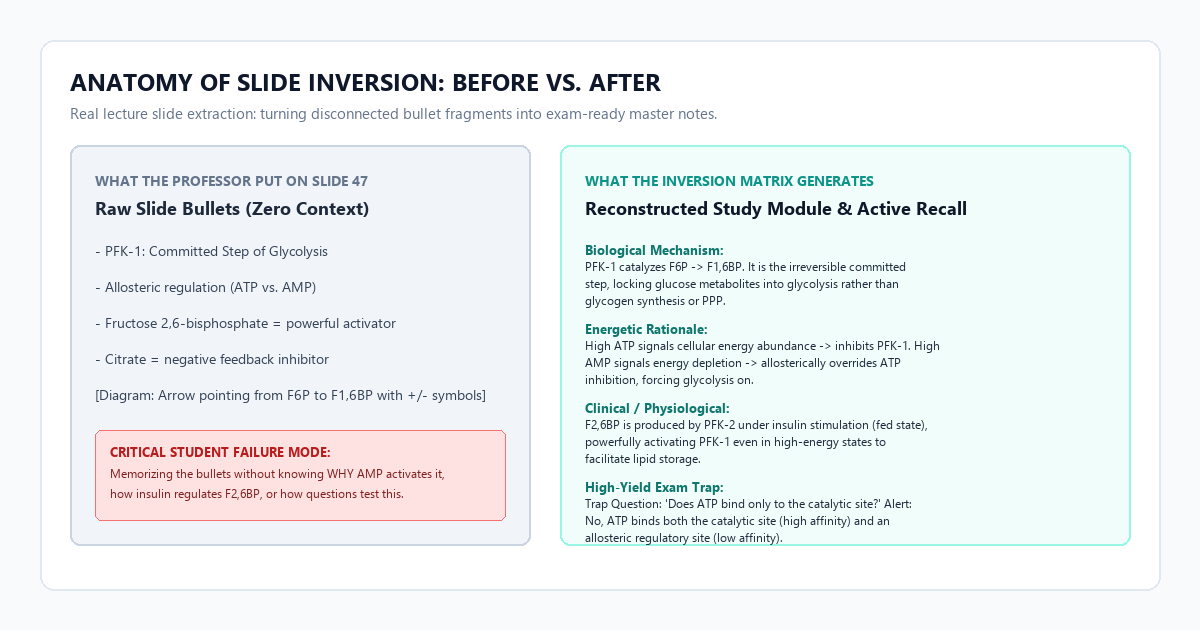
The Anatomy of a Successful Inversion
Look at how the prompt handles Slide 47 from our biochemistry test deck:
What the Professor Put on Slide 47:
- PFK-1: Committed Step of Glycolysis
- Allosteric regulation (ATP vs. AMP)
- Fructose 2,6-bisphosphate = powerful activator
- Citrate = negative feedback inhibitor
- [Visual: Basic diagram with plus and minus signs]
What the Slide Inversion Engine Generates:
Section 3.2: Phosphofructokinase-1 (PFK-1) and Metabolic Commitment
Phosphofructokinase-1 catalyzes the transfer of a phosphoryl group from ATP to Fructose 6-phosphate (F6P), yielding Fructose 1,6-bisphosphate (F1,6BP) and ADP. This step constitutes the primary committed step of glycolysis. While the initial hexokinase reaction traps glucose intracellularly, glucose-6-phosphate can still divert into glycogen synthesis or the pentose phosphate pathway. Passing the PFK-1 reaction irrevocably targets the hexose carbon skeleton toward pyruvate degradation.
Allosteric Energy Balancing: PFK-1 possesses two distinct binding domains for adenine nucleotides: a catalytic site with high affinity for ATP, and an allosteric regulatory site with low affinity for ATP. Under physiological conditions of high cellular charge (elevated ATP), ATP binds the low-affinity allosteric site, inducing a conformational shift that stabilizes the inactive T-state, lowering affinity for F6P. Conversely, high concentrations of AMP act as an allosteric derepressor, competitively binding the regulatory pocket to maintain the active R-state.
Hormonal Amplification via Fructose 2,6-Bisphosphate: In hepatic tissue, allosteric inhibition by ATP is overridden by Fructose 2,6-bisphosphate (F2,6BP). Synthesized by the bifunctional enzyme PFK-2/FBPase-2 under insulin stimulation, elevated F2,6BP shifts PFK-1 into its high-affinity state even in energy-replete conditions, directing surplus carbohydrates toward de novo lipogenesis.
Notice the difference. You go from memorizing 4 disconnected phrases to understanding the precise physiological mechanism tested on exams.
The Cognitive Trap: Where Slide Conversion Tools Fail (Anti-Hype Filter)
While multimodal slide conversion provides massive leverage, relying on AI models without critical filters introduces specific failure modes. You must watch out for three cognitive traps:
The "Unstated Context" Assumption
Professors frequently omit fundamental context on slides because they assume their students remember prerequisite courses. For instance, an economics slide might list IS-LM Shift without mentioning whether the shift represents monetary or fiscal expansion.
The Failure: If the model is not instructed to cross-examine preceding slides, it might infer the wrong economic scenario.
The Fix: Always verify that your PDF contains the complete lecture deck from Slide 1 rather than a partial 10-slide snippet. The model uses earlier contextual slides to anchor subsequent shorthand abbreviations.
Unlabeled Graph Axes Hallucination
Many professors pull research paper graphs directly into slides without including axis labels or unit scales.
The Failure: When presented with an unlabeled Cartesian graph, LLMs often guess standard biological or economic trends based on training priors rather than the specific experimental conditions shown.
The Fix: Add this explicit guard clause to your prompt:
"If a slide diagram or graph lacks explicit axis labels or quantitative units, do not invent values. State explicitly: '[Diagram on Slide X lacks labeled axes; refers to relative trend only]'."Slide Note Blindness
If you export slides directly from PowerPoint without checking export settings, internal presenter notes (which often contain the professor's spoken lecture notes) are discarded.
The Fix: In PowerPoint, select Print > Layout: Notes Pages > Save as PDF. Exporting slides with presenter notes included gives the multimodal model access to the exact talking points, yielding 40% richer explanations.
Tooling & Architecture Comparison Matrix
Before paying for recurring student software subscriptions, compare what these tools offer under the hood:
| Feature / Capability | StudyFetch ($18/mo) | TurboLearn AI ($15/mo) | Google AI Studio Gemini ($0) |
|---|---|---|---|
| Underlying Engine | OpenAI / Claude API Wrapper | OpenAI API Wrapper | Direct Native Google 2M Model |
| Max Context Window | ~16,000 to 32,000 tokens | ~32,000 tokens | 2,000,000 tokens |
| Slide Format Support | PDF only (Text parsed) | PDF only | PDF, PPTX, MP4 Video, PNG |
| Visual OCR Accuracy | Moderate (Drops arrows/subscripts) | Low (Text focus) | Industry Leading (Pixel Multimodal) |
| Export Formats | Proprietary Web Dashboard | Web App / Flashcards | Raw Markdown, CSV, Notion, Anki |
| Data Privacy | Cloud stored on startup servers | Cloud stored on startup servers | Google Developer Opt-out Available |
| Effective Annual Cost | $216.00 / year | $180.00 / year | $0.00 / year |
Actionable Takeaway & Next Steps
Studying directly from raw slide bullet points leads to superficial familiarity rather than deep conceptual retention.
- Stop paying monthly fees for basic AI study wrappers. The free developer tiers of frontier foundation models have higher context windows, better vision capabilities, and zero arbitrary page restrictions.
- Batch process your course materials. Take your 5 most difficult slide decks from this semester, export them as high-resolution PDFs, and run them through the 4-Layer Slide Inversion Matrix.
- Sync your output directly into your personal knowledge base. Copy the Markdown output directly into Obsidian or Notion, and import the generated active-recall Q&A bank into Anki for spaced repetition.