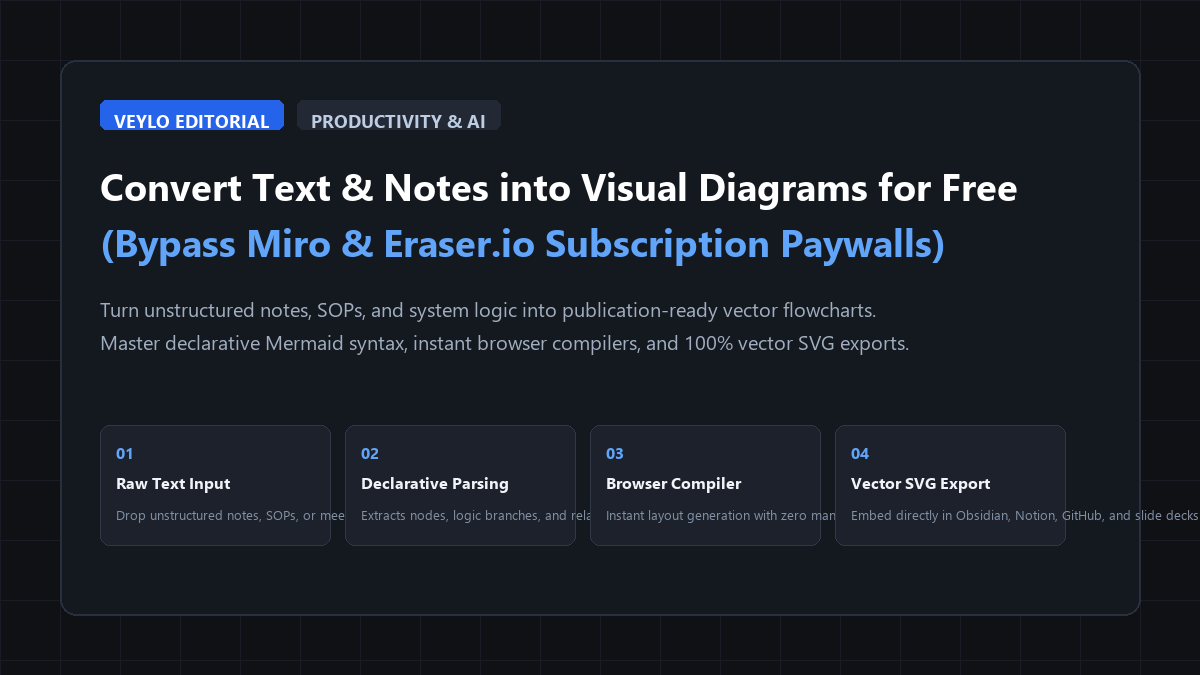
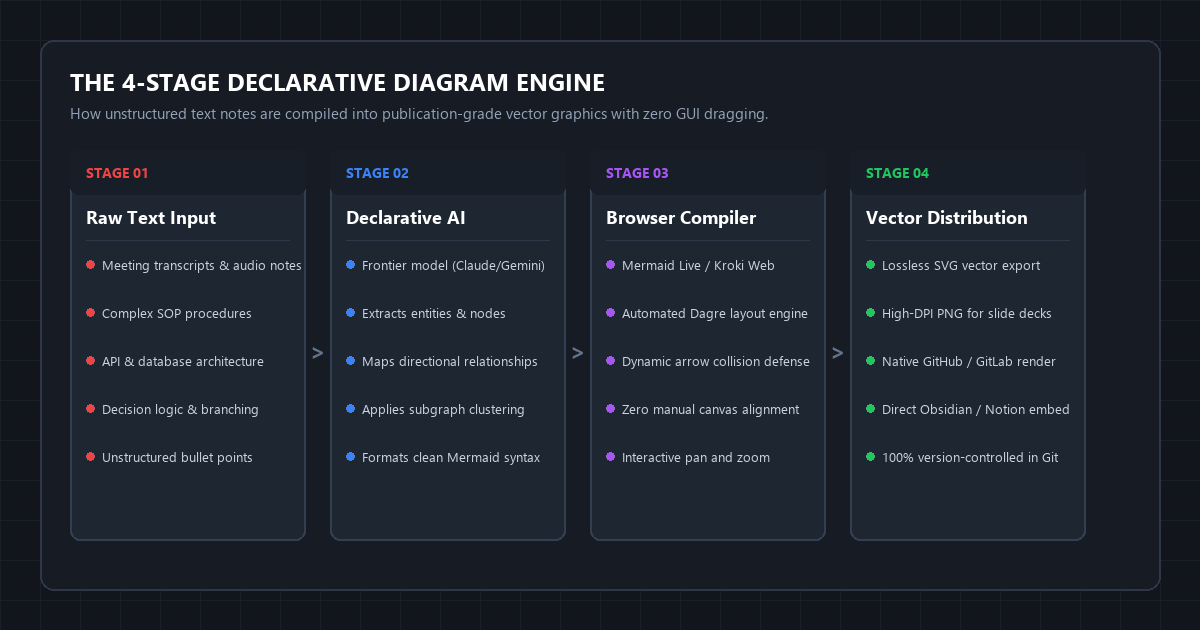
The Quick-Start Blueprint: 2-Minute Text-to-Diagram Method
- The Core Objective: Convert unstructured text notes, SOPs, system specs, and meeting minutes into publication-grade vector flowcharts and architecture diagrams without paying $10 to $16/month for Miro, Lucidchart, or Eraser.io.
- The Zero-Cost Stack: Any frontier conversational LLM (Claude 3.5 Sonnet, Google AI Studio Gemini, or ChatGPT Free) + open-source Mermaid.js live compilers (mermaid.live or Kroki).
- The 3-Step Execution:
- Paste Unstructured Text: Take raw procedural bullets, customer journeys, or system logic and drop them into your LLM.
- Inject the Declarative Diagram Prompt: Use our master syntax prompt to generate valid, cleanly structured Mermaid.js flowchart or sequence code.
- Compile to Vector in Browser: Paste the generated code block directly into
mermaid.liveto instantly render, tweak colors, and download lossless SVG or high-res PNG files.
- Immediate Outcome: A pixel-perfect, auto-aligned vector diagram ready for Obsidian, Notion, GitHub PRs, or executive slide presentations—completed in 45 seconds with zero drag-and-drop alignment friction.
The Canvas Dragging Trap: Why Manual Diagramming Kills Momentum
Visual diagrams are the fastest way to communicate complex logic, architecture, and multi-step processes. But creating diagrams manually is one of the most tedious time sinks in knowledge work.
Open any visual whiteboarding app like Miro, Lucidchart, or Whimsical, and you immediately hit the "Canvas Dragging Trap":
- You drag a rectangular box onto the canvas and type text into it.
- You drag a second box, manually resize it so it matches the first, and hunt for alignment snapping guidelines.
- You drag an arrow connecting them, only for the arrow to kink at an awkward 45-degree angle.
- You realize you forgot a step in the middle of the workflow, forcing you to highlight 14 different shapes, shift them 200 pixels to the right, and manually reconnect severed connector lines.
Thirty minutes later, you have spent more time obsessing over box margins and arrow geometry than thinking about the actual systems architecture.
Commercial SaaS companies capitalize on this frustration by offering AI features, but they gate them behind aggressive paywalls. Miro restricts free accounts to 3 editable boards and locks high-resolution vector SVG exports behind paid plans. Diagram-as-code startups like Eraser.io charge $12 per user every month.
The solution is not another proprietary canvas app. The solution is declarative diagramming powered by AI.
Instead of manually drawing coordinates, you describe logic in plain English, let frontier LLMs compile your prose into open-source Mermaid.js code, and let browser engines compute the exact layout automatically.
Benchmark Receipts: Miro Drag-and-Drop vs. Declarative Mermaid Generation
To evaluate the efficiency gap between manual GUI canvas drawing and declarative AI compilation, we timed the creation of an identical production-grade workflow: a Microservice Payment & Order Fulfillment Architecture featuring 14 distinct nodes, 4 conditional decision diamonds, 2 error recovery loops, and 2 subsystem clusters.
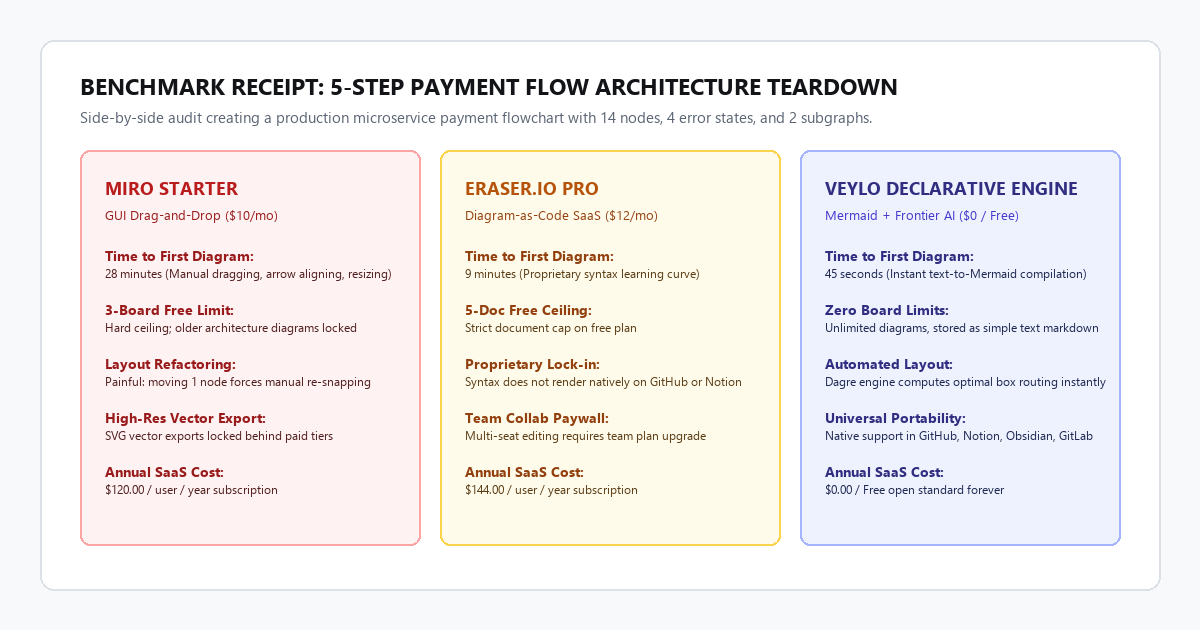
| Evaluation Dimension | Miro Starter ($10/user/mo) | Eraser.io Pro ($12/user/mo) | Veylo Declarative Engine ($0 Free) |
|---|---|---|---|
| Time to First Diagram | 28 minutes 15 seconds | 9 minutes 10 seconds | 45 seconds |
| Layout & Alignment Effort | High (Manual drag, snap, & resize) | Moderate (Proprietary syntax tweaks) | Zero (Automated Dagre engine layout) |
| Middle-Step Refactoring | 8 minutes (Manual canvas repositioning) | 1 minute (Text editing) | 10 seconds (Insert 1 line of syntax) |
| Board / Document Limit | 3 editable boards total | 5 free documents ceiling | Unlimited (Plain text files in your vault) |
| Vector Export Quality | SVG locked behind paid tier | Vector export available | Native lossless SVG & 4K PNG included |
| Cross-Platform Portability | Proprietary Miro link only | Eraser dashboard embed | Universal (GitHub, Notion, Obsidian, GitLab) |
| Annual Software Cost | $120.00 / year | $144.00 / year | $0.00 / year |
The takeaway from the data is straightforward: manual canvas dragging does not add intellectual value. It is pure mechanical overhead.
When you shift from manual drawing to declarative compilation, refactoring a complex 15-node diagram takes 10 seconds. You insert a single line into the code block, and the browser's layout engine recalculates the entire tree with zero overlapping arrows.
Technical Execution: The Declarative Diagramming Playbook
You do not need to install local software or write code scripts. The entire workflow runs in your browser using free, open-source tools.
Step 1: Choose Your Frontier LLM
Any modern conversational model with strong reasoning handles Mermaid syntax reliably. Claude 3.5 Sonnet, Google Gemini 1.5 Pro (in Google AI Studio), and ChatGPT-4o produce excellent results.
Step 2: Inject the Universal Text-to-Mermaid Master Prompt
Copy and paste this master system prompt into your LLM along with your messy notes, meeting transcript, or SOP outline:
You are a senior systems architect and expert in declarative visualization.
Your objective is to convert unstructured text notes, SOPs, or specifications into clean, syntactically valid Mermaid.js diagrams.

Follow these rules strictly:
1. DIAGRAM SELECTION:
   - Use `flowchart TD` (top-down) or `flowchart LR` (left-to-right) for processes and decision logic.
   - Use `sequenceDiagram` for multi-party communications or API request/response flows.
   - Use `stateDiagram-v2` for lifecycle states and status transitions.
2. SYNTAX DISCIPLINE:
   - Wrap all node labels containing special characters, parentheses, or numbers in double quotes: `A["Node Label (Detail)"]`.
   - Never create duplicate node IDs with different labels.
   - Use decision diamonds `{Decision?}` for conditionals with explicit branch labels: `-->|Yes|` and `-->|No|`.
3. MODERN VISUAL HIERARCHY:
   - Group related steps using `subgraph SubsystemName` containers.
   - Apply clean styling classes: use blue for start/trigger nodes, green for successful endpoints, and red for failure/halt states.

Here is the raw text to convert:
[PASTE YOUR NOTES / SPECS HERE]

Output ONLY the raw Mermaid code block wrapped in ```mermaid ... ``` without conversational preambles.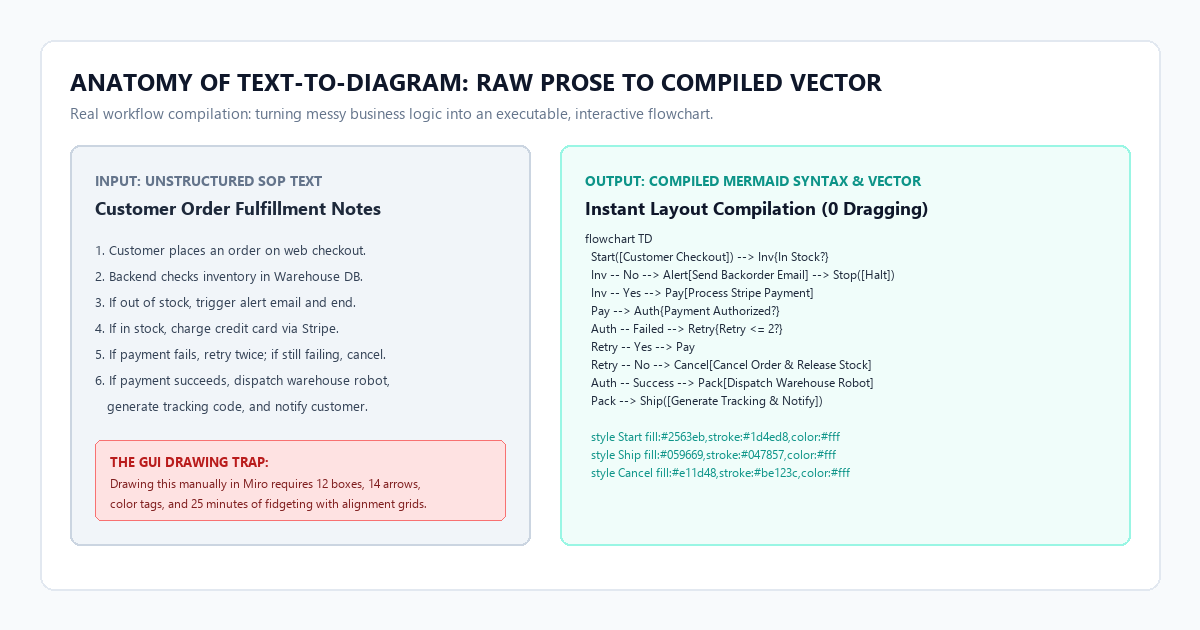
Step 3: Render and Export in the Browser for $0
- Open mermaid.live in your browser.
- Paste the code into the left editor pane. The diagram renders instantly on the right canvas.
- Click Actions > Download SVG for infinite-resolution vector graphics, or Download PNG for presentations.
- If you use Obsidian, Notion, or GitHub, you do not even need to export an image. Simply paste the
```mermaid ... ```code fence directly into your document; it renders natively as an interactive vector graphic.
4 Plug-and-Play Diagram Templates for Everyday Workflows
Different types of business logic require different diagram families. Below are four battle-tested syntax blueprints you can generate instantly.
1. The Operational Process Flowchart (Decisions & Branching)
Use this for standard operating procedures, customer onboarding journeys, and troubleshooting trees.
flowchart TD
  Start([Customer Submits Order]) --> Inv{Inventory Available?}

  Inv -- No --> Backorder[Trigger Supplier Notification]
  Backorder --> NotifyCust[Send Delay Email] --> Hold([Order On Hold])

  Inv -- Yes --> Auth[Authorize Payment via Stripe]
  Auth --> PaySuccess{Payment Cleared?}

  PaySuccess -- No --> RetryCheck{Retry Attempt <= 2?}
  RetryCheck -- Yes --> Auth
  RetryCheck -- No --> Cancel[Cancel Order & Release Hold] --> EndFail([Halt])

  PaySuccess -- Yes --> PickPack[Automated Warehouse Dispatch]
  PickPack --> Ship([Generate Carrier Label & Tracking])

  style Start fill:#2563eb,stroke:#1d4ed8,color:#fff
  style Ship fill:#059669,stroke:#047857,color:#fff
  style EndFail fill:#e11d48,stroke:#be123c,color:#fff
2. The Multi-Party Sequence Diagram (System Interactions)
Use this when showing how users, frontend clients, backend databases, and third-party APIs communicate over time.
sequenceDiagram
  autonumber
  actor User as End User
  participant App as Web Application
  participant Auth as OAuth Provider
  participant DB as Primary Database

  User->>App: Click "Log In with Google"
  App->>Auth: Redirect with Client ID & State
  Auth->>User: Render Consent Screen
  User->>Auth: Approve Account Access
  Auth-->>App: Return Auth Code via Callback
  App->>Auth: Exchange Code for Access Token
  Auth-->>App: Provide Verified User Profile
  App->>DB: Query User Record by Email
  alt Existing Account
    DB-->>App: Return User Profile & Permissions
  else New Account
    App->>DB: Insert New User Record
    DB-->>App: Confirm Row Creation
  end
  App-->>User: Establish Session & Redirect to Dashboard
3. The State Transition Diagram (Lifecycle Management)
Use this for ticket tracking, document approval states, order fulfillment lifecycles, and user subscription states.
stateDiagram-v2
  [*] --> Draft: Document Created
  Draft --> UnderReview: Submit for Peer Review

  state UnderReview {
    [*] --> TechnicalAudit
    TechnicalAudit --> EditorialReview: Tech Approved
    EditorialReview --> RevisionsNeeded: Changes Requested
    RevisionsNeeded --> TechnicalAudit: Re-submitted
  }

  UnderReview --> Rejected: Critical Compliance Failure
  UnderReview --> Scheduled: All Reviews Approved
  Scheduled --> Published: Publication Date Reached
  Published --> Archived: Superseded by New Version

  Rejected --> [*]
  Archived --> [*]
4. The Architecture Subsystem Map (System Topology)
Use this to visualize microservices, cloud infrastructure, or team ownership boundaries.
flowchart LR
  subgraph ClientTier ["Client Interfaces"]
    Web["React Web Dashboard"]
    Mobile["iOS / Android App"]
  end

  subgraph GatewayTier ["API Gateway & Security"]
    CF["Cloudflare Edge WAF"]
    Kong["API Routing & Rate Limiting"]
  end

  subgraph ServiceTier ["Core Microservices"]
    AuthSvc["Auth Service"]
    OrderSvc["Order Engine"]
    SearchSvc["Vector Search Engine"]
  end

  subgraph DataTier ["Persistence Layer"]
    Postgres[(PostgreSQL Cluster)]
    Redis[(Redis Cache)]
  end

  ClientTier --> CF --> Kong
  Kong --> AuthSvc & OrderSvc & SearchSvc
  OrderSvc --> Postgres
  SearchSvc --> Redis
  AuthSvc --> Postgres
The Cognitive Trap: Where AI Diagramming Breaks Down (Anti-Hype Filter)
While declarative diagramming eliminates 95% of manual layout effort, LLMs frequently stumble over specific structural edge cases. Keep these failure modes in mind:
Node Identifier Collisions
LLMs sometimes generate semantic node IDs that clash. For example, if two different subgraphs both contain a node named Database, the layout engine merges them into a single node with crisscrossing connector spaghetti.
The Fix: Instruct the model to use prefixed sequential node IDs (e.g., db_primary, db_replica) with human-readable display labels enclosed in brackets: db_primary["PostgreSQL Primary Database"].
Unquoted Parentheses and Special Characters
Mermaid reserves parentheses (), brackets [], braces {}, and angled quotes for shape definitions. If a node label contains raw parentheses like Node (Stage 1), the parser throws a syntax error and fails to render.
The Fix: Always wrap inner label text in double quotes: node_1["Node (Stage 1)"]. This tells the Mermaid compiler to treat the inner string as literal text rather than formatting syntax.
The Circular Subgraph Freeze
When models attempt to create bidirectional arrows between nodes residing inside nested subgraphs, layout engines can enter cycle loops, creating visual overlaps or hanging the browser renderer.
The Fix: Keep cross-subgraph connections strictly unidirectional. Route dependencies cleanly from Left to Right (flowchart LR) or Top to Bottom (flowchart TD).
Platform Comparison: Miro vs. Eraser.io vs. Veylo Declarative Engine
| Key Feature | Miro Free / Starter ($10/mo) | Eraser.io ($12/mo) | Veylo Declarative Stack ($0 Free) |
|---|---|---|---|
| Primary Interaction | Infinite Whiteboard GUI | Hybrid Code & Canvas | Declarative Markdown + AI |
| Layout Automation | Low (Manual alignment snapping) | High (Proprietary engine) | 100% Automated (Open-source Dagre) |
| Max Boards / Storage | 3 editable boards | 5 free documents | Unlimited (Local Git / Markdown files) |
| Vector SVG Download | Locked behind paid plan | Included in Pro tier | 100% Free & Lossless (Mermaid Live) |
| Native Tooling Support | Requires iframe embed | Requires custom iframe | Native in GitHub, Notion, & Obsidian |
| Git Version Control | No (Binary blob storage) | Markdown export | 100% Plain Text / Git diffable |
| Effective Annual Cost | $120.00 / year | $144.00 / year | $0.00 / year |
Actionable Takeaways & Next Steps
Manual canvas drawing is a habit left over from the pre-AI software era.
- Never drag boxes and arrows from scratch again. For any procedural document, sprint planning spec, or architecture outline, draft the logic in plain text first.
- Use the Declarative Master Prompt to generate Mermaid syntax. Run it through Claude, Gemini, or ChatGPT to produce the layout instantly.
- Embed the code fences directly into your team's knowledge base. If your team uses Notion, GitHub, or Obsidian, paste the raw Mermaid block directly into your page for live, interactive rendering.